Skip to Content
FPD.DEV FPD.DEVThe Future of Display & Systems Development
  • Services
  • Products
  • Learning
  • Schedule Free Consultation
  • Sign in
  • 0
  • 0
FPD.DEV FPD.DEVThe Future of Display & Systems Development
  • 0
  • 0
    • Services
    • Products
    • Learning
  • Sign in
  • Schedule Free Consultation

Products / LCD Enhancements / Touch Panels

Touch panels.
Built around your application.

Start with an OEM touch panel or develop a custom interface. Match the sensing technology, cover, controller and host connection to the people using your display—from initial prototypes to small runs and production.

Explore OEM touch panelsPlan a custom touch panel
Touch technologiesDisplay integrationSmall runsDiscuss your project

Choose how people interact

Different technologies. Different strengths.

Begin with finger, glove or stylus use, then consider water, light, cleaning, mechanical space and the required touch behavior. Evaluate the complete assembly in its operating environment.

01 / PROJECTED CAPACITIVE

A continuous glass touch surface.

PCAP detects changes in an electric field through a cover. It suits modern multi-touch interfaces and a flush front surface.

Design around: cover thickness, sensor pattern, controller tuning, grounding and electrical noise. Glove and wet operation depend on the selected sensor, controller and configuration.

Explore custom PCAP panels →
02 / INFRARED

A sensing frame around the display.

IR emitters and receivers detect interruptions in a light grid. The sensing frame avoids a conductive touch layer across the viewing area and can support finger, glove or suitable stylus input.

Design around: frame depth, sensing aperture, cover position, cable exit and ambient light. Keep the optical path clear and assess contamination and unintended beam interruptions.

Explore OEM IR panels →
03 / RESISTIVE

Pressure-based input.

A flexible top layer contacts a conductive layer beneath it when pressed. Resistive touch is useful for glove or passive-stylus operation and straightforward industrial controls.

Design around: activation force, surface wear, optical transmission, sealing and calibration. Conventional analog designs generally provide single-touch input; confirm the exact controller behavior.

Discuss a resistive touch requirement →
04 / SURFACE ACOUSTIC WAVE

Touch located by acoustic waves.

SAW sends ultrasonic waves across glass; a touch changes the received signal. It offers an all-glass sensing surface for suitable kiosk and interactive-display applications.

Design around: the acoustic path, edge mounting, surface contamination and the supplier’s integration rules. Review current supply and controller support for new designs or legacy replacements.

Review the right technology →

Technology is only the starting point. Touch count, accuracy, latency, glove support, environmental ratings and operating-system compatibility are specific to the selected product and assembly.

Standard OEM components

Start with an existing touch panel.

Compare projected-capacitive panels and infrared assemblies. Use each product page to review dimensions, controller requirements and locally hosted documentation, then confirm the mechanical and electrical fit.

OEM projected capacitive / P-Cap

Glass-film-film panels with cover glass and up to ten finger inputs when paired with the specified controller. USB operation requires the matching controller board; confirm controller, cable and tuning scope in your quotation.

Representative FID-1540 P-Cap panel family photographOEM / PROJECTED CAPACITIVE

12.1-inch P-Cap touch panel

LCE-030013-00

FID-1540-101-H12
Cover outline: 287.0 × 220.9 mm.
Matched controller: FID-1855-030-A01.

View product
Representative FID-1540 P-Cap panel family photographOEM / PROJECTED CAPACITIVE

15.0-inch P-Cap touch panel

LCE-030014-00

FID-1540-061-H15
Cover outline: 346.5 × 275.0 mm.
Matched controller: FID-1855-030-A03.

View product
Representative FID-1540 P-Cap panel family photographOEM / PROJECTED CAPACITIVE

15.6-inch P-Cap touch panel

LCE-030015-00

FID-1540-081-H15
Cover outline: 390.4 × 233.0 mm.
Matched controller: FID-1855-030-A04.

View product

Photographs represent the panel family. Each product includes model-specific dimensions and the locally hosted FID-1540 datasheet (June 1, 2026). LCD and controller inclusion are not implied.

OEM infrared / IR

These IR assemblies combine a black frame, cover glass and USB connection.

GreenTouch 10.4-inch IR Touch Panel with Cover GlassOEM / INFRARED

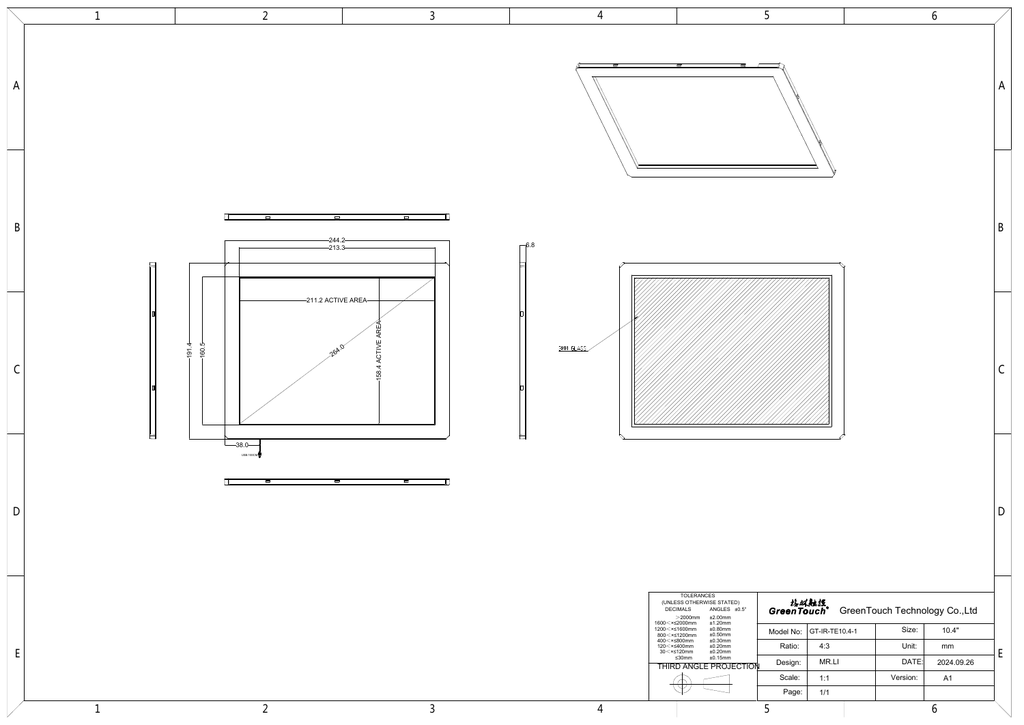
10.4-inch IR touch panel

LCE-030010-00

Black IR frame with cover glass for display integration. Check the active opening, overall dimensions, mounting and host support.

View product
GreenTouch 12.1-inch IR Touch Panel with Cover GlassOEM / INFRARED

12.1-inch IR touch panel

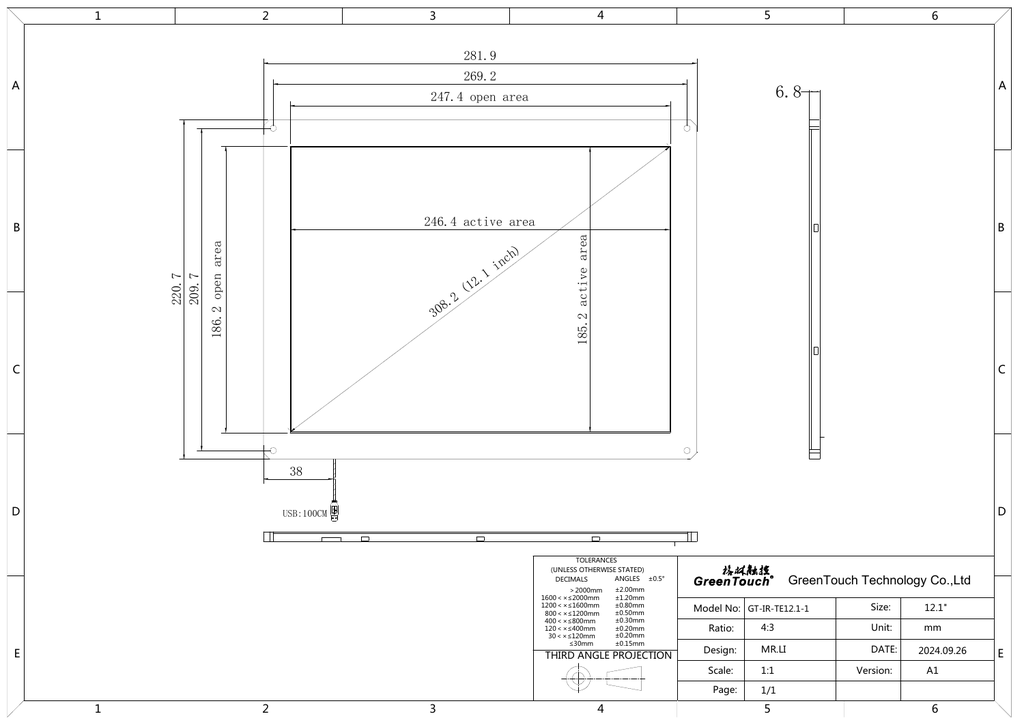
LCE-030011-00

Black IR frame with cover glass for display integration. Check the active opening, overall dimensions, mounting and host support.

View product
GreenTouch 15.0-inch IR Touch Panel with Cover GlassOEM / INFRARED

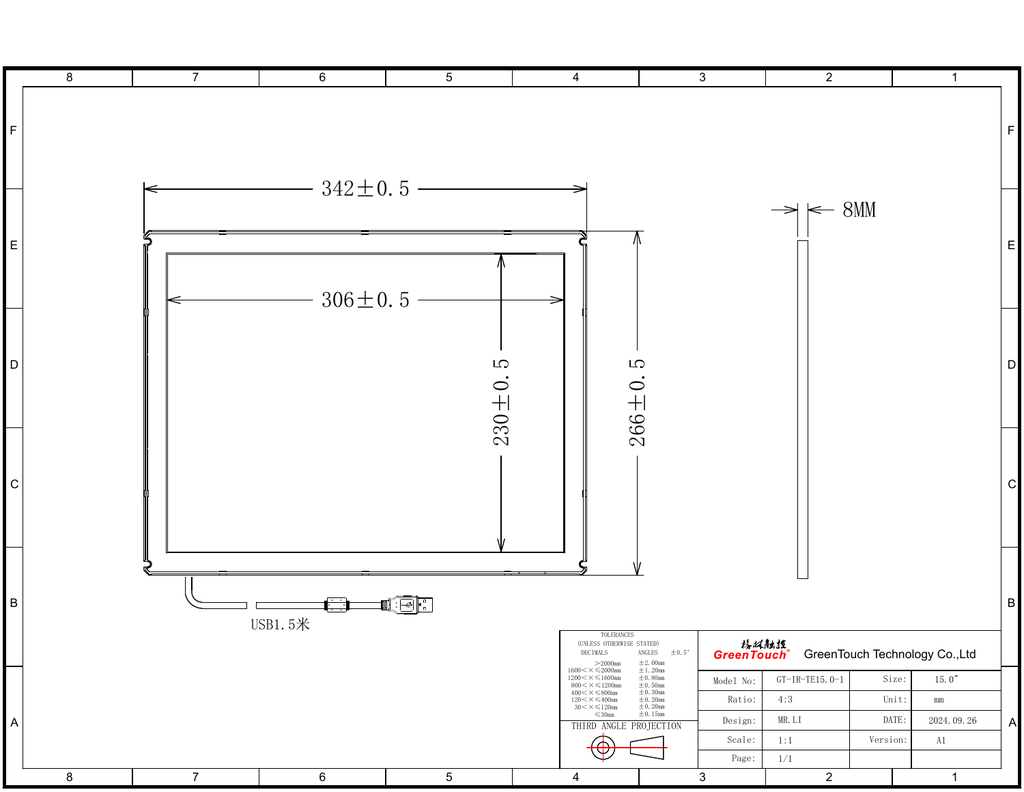
15.0-inch IR touch panel

LCE-030012-00

Black IR frame with cover glass for display integration. Check the active opening, overall dimensions, mounting and host support.

View product

Diagonal size alone does not establish compatibility. Confirm aspect ratio, sensing aperture and tolerances against the display drawing. Availability, lead time and quantities are confirmed for your project.

Browse all touch-panel products →

Custom development

Design the touch interface around the product.

Keep a standard sensor where it fits, customize the cover and integration, or develop a new sensor or IR frame when the application requires it. We help define the route before committing to tooling.

Custom projected capacitive

Define the viewing opening, sensor and cover outline, border artwork, tail location, controller and connection. Review cover thickness, coatings and the intended finger, glove or stylus use together.

LCE-03008-00 / Configurable product family

Custom PCAP product details →

Custom infrared frames

Develop the sensing aperture, frame geometry, mounting and cable routing around the display. For our square-display assemblies, include cover glass and position the IR sensing plane above the selected glass surface.

LCE-03009-00 / Configurable product family

Custom IR product details →

Prototypes and small runs.

Bring us your target quantity, dimensions and use case. For early builds, adapting a standard sensor or frame can reduce tooling and qualification work. Where a unique geometry is necessary, we scope samples, tooling, setup and validation separately.

Small-run development is reviewed case by case. Minimum quantities, non-recurring engineering, lead time and the production route depend on the sensor, cover and manufacturing process.

01 / DEFINE

Requirements and fit

Agree the display opening, user interaction, environment, host interface and acceptance checks.

02 / PROTOTYPE

Build and evaluate

Integrate samples, tune the controller and evaluate edge response, false touches, optics and mechanical fit.

03 / TRANSFER

Prepare for production

Document drawings, firmware settings, inspection criteria and the approved assembly process for the agreed build quantity.

The complete display stack

Touch is part of the system.

Glass, coatings and bonding

Select cover glass, anti-reflection treatment, black borders and attachment together. Bonding joins two rigid surfaces; lamination includes at least one flexible film. The selected touch technology determines which layers can sit above or below its sensing surface.

Optical bonding and lamination →

EMI shielding and heaters

Coordinate conductive coatings, mesh, grounding and heater routing with the sensor. Evaluate touch performance with the heater, backlight and nearby electronics operating.

Explore LCD enhancements →

Controller and host connection

Confirm USB HID, I²C or serial support for the chosen controller, then review power, connectors, cable routing, operating-system support and coordinate mapping. Specify rotation, gestures and recovery behavior.

Embedded interface development →

Touch breakouts & custom cables →

Square-display integration

Explore the SQR family and use the Display Designer to begin a touch-enabled concept. The selected sensor, frame and mechanical stack still need an engineering review before release.

Start a square-display design →

Common planning questions.

Can a standard panel fit my display?

Compare the sensing opening and outer dimensions with the display active area and bezel. Check corner clearance, mounting, cable exit and the controller connection; a matching diagonal is not enough.

Will it work with gloves or water on the surface?

Specify the actual glove, liquid exposure and operating conditions. Test those conditions with the intended cover and controller settings. Do not assume a technology name guarantees the required behavior.

Can I order a few custom units?

We can review prototypes and small runs. The practical route depends on whether a standard sensor can be reused or a new design requires tooling. Share sample and production quantities so both routes can be assessed.

Can touch, a heater and EMI shielding be combined?

Yes, they can be considered as one engineered stack. Layer order, electrical isolation, grounding, optical performance and touch-controller tuning must be evaluated together.

Start with your application

Tell us how the display will be used.

Send the display model or drawing, target quantities and the touch behavior you need. We will help select an OEM panel or define a custom development path.

Discuss your touch panelExplore LCD enhancements

Useful starting information

  • Active area, overall dimensions and mounting space.
  • Finger, glove or stylus input and number of simultaneous touches.
  • Water, cleaning, sunlight, temperature and electrical environment.
  • Cover glass, coatings, bonding, heater and shielding requirements.
  • Controller interface, host operating system and cable constraints.
  • Prototype quantity, expected production volume and timing.

Subscribe to the FPD.DEV newsletter

Get display and embedded engineering articles, Edge AI insights, tool updates and product news by email.

Thanks for registering!

Subscribe

By subscribing, you agree to receive the FPD.DEV newsletter. You can unsubscribe at any time. See our Privacy Policy.


FPD.DEV
The Future of Display & Systems Development

  • Contact Us


  • Privacy Policy


Get in touch

Operated by Colabmo · Quality, operations & ERP support.


Cookie Policy

Copyright © 2026 Colabmo ​ ​
English (US) Español
Powered by Colabmo
Powered by Colabmo

Text

We use cookies to provide you a better user experience on this website. Cookie Policy

Only essentials I agree