The problem is contrast under ambient light.
A display’s dark-room contrast ratio does not describe how it will look with a bright reflection over the image. Ambient light reflected toward the observer raises the apparent black level as well as the white level, making displayed information harder to distinguish.
Optical bonding replaces an internal air gap with a suitable transparent bonding material, reducing reflection at those interfaces. An anti-reflective (AR) coating on the outer surface addresses a different interface: the surface facing the viewer. Combining them can be particularly effective for a reflection-limited assembly. Our optical bonding and lamination guide explains these complementary processes.
OpticalOracle™ model comparison
See brightness and reflection side by side.
These screenshots were captured from FPD.DEV OpticalOracle™ 3.0. All three use the same FPD.DEV test image, 1,920 × 1,080 resolution, 1,000:1 dark-room contrast, 10,000-lux Bright Daylight source and 60° source angle above the display surface (30° from normal). Source position and viewing geometry are held constant.
1. Air gap · 500 cd/m²

- High
- 2.06:1
- Low
- 0.62:1
- Average
- 0.91:1
- Target
- 0.63:1
2. Air gap · 1,000 cd/m²

- High
- 4.10:1
- Low
- 1.23:1
- Average
- 1.81:1
- Target
- 1.26:1
3. AR + bond · 500 cd/m²

- High
- 128:1
- Low
- 8.11:1
- Average
- 60.96:1
- Target
- 11.75:1
Select an image to view the full-size screenshot. These are simulator renderings, not photographs or measured product results. Their settings are separate from the simplified numerical example below. High, Low, Average and Target are the calculated image-based readouts reported by OpticalOracle™ for each saved condition. Target refers to the marked sampling region. These tool-specific readouts, including values below 1:1, should not be substituted for a uniform white/black ambient contrast measurement.
The images are generated from physics and optical models, mathematical calculations and the selected material, lighting and display inputs. Use them to get a relative idea of how a design change may affect reflection and readability. The brightness you see on your own screen is not a calibrated reproduction of the stated cd/m².
Current model assumptions include first-pass interface reflections, approximate surface scatter and effective AR treatments. They do not fully model multiple internal reflections, absorption, detailed thin-film interference or measured angular scattering. Validate the final optical assembly with measurements under its intended conditions.
Feedback is welcome. Share your model settings, observed behavior or measured comparison data to help us improve our optical models and visualizations. Send OpticalOracle™ feedback →
Reading the OpticalOracle™ ray path
Follow the light through the stack.
The Ray Path view reads from the ambient air at the top, through the cover glass or touch layer, into the air gap or optical bond, and finally to the display’s front polarizer. Each horizontal boundary is an optical interface. The drawing is schematic: layer heights, ray lengths and arrow sizes are not manufacturing dimensions or a calibrated measure of reflected power.
What the lines and colors mean.
- Orange: the forward light path into the stack. At an interface, some light continues through and some is reflected.
- Dashed vertical line: the surface normal, perpendicular to the layers. “30° from normal” means 60° above the display surface—the same source-angle convention used in the comparison above.
- Reflection arrows: the returning branches at individual interfaces. The legend uses black for untreated reflection, blue for HEA and purple for AR. These colors identify treatments, not the color of the reflected light. Whether a reflection produces glare depends on the source and viewer geometry.
Refractive index explains the bends.
Refractive index, n, describes the phase speed of light in a material relative to vacuum: n = c / v. In the illustrated air-gap setup, the model uses air n = 1.0003, cover glass / capacitive touch n = 1.5200, a second air layer at 1.0003, and an effective polarizer-film index of 1.5000. These are model inputs, not universal specifications for every glass, touch sensor or polarizer.
For an oblique ray, entering a higher-index material bends the transmitted light toward the normal; entering a lower-index material bends it away. Snell’s law relates the angles: n₁ sin θ₁ = n₂ sin θ₂, with both angles measured from the normal. Using the illustrated indices, a ray arriving from air at 30° travels at about 19.2° inside the glass, returns to 30° in a parallel air gap, then travels at about 19.5° in the effective polarizer layer.
Read the reflection at each interface.
| Interface | Index transition | Displayed photopic R |
|---|---|---|
| 1 · Air → cover / touch | 1.0003 → 1.5200 | 4.41% |
| 2 · Cover / touch → air gap | 1.5200 → 1.0003 | 4.41% |
| 3 · Air gap → polarizer | 1.0003 → 1.5000 | 4.15% |
Photopic R is the model’s visible-light reflection percentage, weighted by the CIE V(λ) daylight visual-sensitivity function. It is not an infrared or UV reflectance specification. The displayed values apply to this setup; they change with the optical inputs and treatment.
For a simple, uncoated, non-absorbing interface at normal incidence, Fresnel reflectance is R = [(n₁ − n₂) / (n₁ + n₂)]². Multiply by 100 for percent. At oblique angles, the calculation also depends on angle and polarization; the normal-incidence formula is not the calculation for the 30° values above.
Do not simply add the three percentages to obtain the reflection reaching the viewer. Light must pass through preceding layers to reach deeper interfaces and pass back through them on its return. Transmission, absorption, repeated reflections, coatings and viewing geometry affect the complete result. OpticalOracle™’s current first-pass approximation does not include all of those effects.
Why bonding and AR work together.
An air gap creates two large index changes behind the cover. Replacing it with a transparent bond whose index is closer to the neighboring materials reduces those internal mismatches and their reflections. As a separate normal-incidence illustration, glass at n = 1.52 against air at n = 1.0003 reflects about 4.25%; against an assumed bond at n = 1.41, that single interface reflects about 0.14%. This is an illustrative input, not a silicone specification or a total-stack result.
The outer air-to-cover interface remains. An AR coating addresses that surface through thin-film interference, while optical bonding addresses the internal air gap. A brighter backlight increases emitted light without removing those reflective interfaces. Explore the processes in our optical bonding and lamination guide and the coating principles in Thin Films & Coatings.
In OpticalOracle™, keep brightness, source angle and ambient conditions fixed. Compare the air gap with a bond using the intended material’s refractive-index data, then vary the outer-surface treatment. Use supplier data at the relevant wavelength and temperature where available, mark estimates as assumptions, and compare the trend before validating the assembly by measurement. Feedback and measured comparisons are welcome to help us improve the models.
Model your own optics.
Connect the images to high ambient contrast ratio.
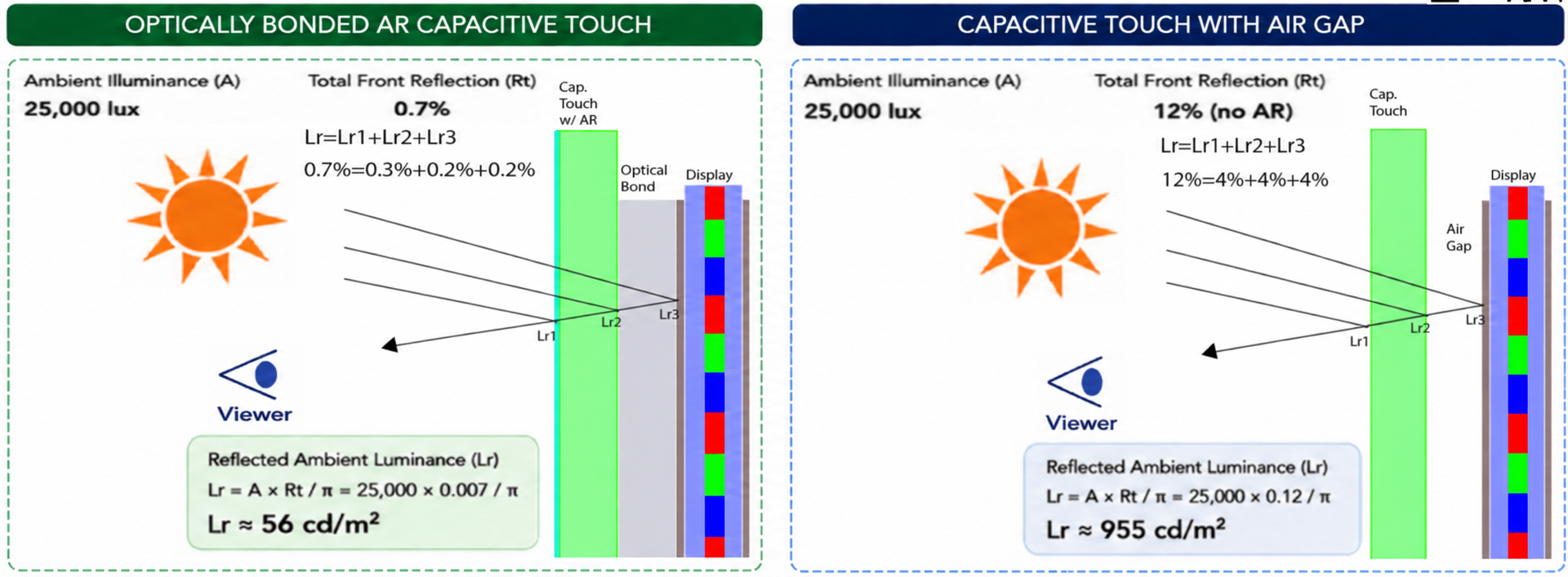
Our High Ambient Contrast Ratio guide explains how reflected ambient light raises the black level and reduces the difference you can see between bright and dark image areas. Its worked example compares 0.7% and 12% assumed total front reflection at 25,000 lux, with the same display luminance.
Use that guide and its calculator for a simplified reflection-budget comparison. Use OpticalOracle™ to explore the layer stack, surface treatment, source angle and visual effects. Their presets, lighting conversions and contrast calculations differ, so compare trends under stated assumptions rather than treating values from the two tools as interchangeable measurements.
For the numerical example in this article, white and black mean total emitted state luminances and contrast is (white + reflection) / (black + reflection). The linked guide currently uses a convention that subtracts black from its white term. Check the definition before transferring values between examples.
Start with a configuration close to your assembly, then compare one change at a time. OpticalOracle™ can help you explore which interfaces and design choices deserve closer evaluation.
- Build a baseline. Open OpticalOracle™ and choose a common configuration such as Air Gap Glass / Cap Touch. Set display brightness, ambient source, source angle and test image to represent your use case.
- Describe your actual stack. Switch to Advanced. Add, remove or reorder material layers from the viewer side toward the display. Enter material names and refractive indices, and select the air-side treatment. Adjust gloss, haze and roughness where you have suitable data; identify estimates as assumptions.
- Save a controlled comparison. Use Add Live Model to Comparison and lock the baseline settings. Keep the same lighting, geometry, test image and dark-room contrast while testing an alternative. Check the lock controls so a later adjustment does not unintentionally change both cases.
- Separate the design changes. First increase only display brightness. Next restore it and replace an internal air gap with your proposed optical bond. Then compare the appropriate AR treatment. Repeat at several source and viewing angles.
- Review and share. Compare the simulated images, reflection estimates and ray paths. Use Copy Weblink or Email / Print / PDF to retain the setup, document assumptions and discuss the next measurements with your team or FPD.DEV.
A transparent, illustrative comparison.
The following example is a calculation, not a measured FPD.DEV product result. Assume a 500 cd/m² white level and 0.5 cd/m² black level, measured at the front of the assembly without ambient reflection. Add 100 cd/m² of reflected luminance equally to white and black for one fixed viewing condition.
Ambient contrast ratio = (white luminance + reflected luminance) / (black luminance + reflected luminance).
| Case | White | Black | Reflected | Ambient contrast |
|---|---|---|---|---|
| Original assembly | 500 | 0.5 | 100 | 6.0:1 |
| Double backlight output | 1,000 | 1.0 | 100 | 10.9:1 |
| Reduce reflections | 500 | 0.5 | 10 | 48.6:1 |
Doubling the backlight is assumed to double both the LCD’s emitted white and black levels. The reduced-reflection case assumes the same emitted luminance and a tenfold reduction in reflected luminance from an improved optical stack. Under these assumptions, reflection reduction produces much more ambient contrast than doubling brightness.
The tenfold reflection reduction is an example input, not a promised bonding or AR specification. Real stacks change transmission, reflections, color and other properties. Sun angle, viewing angle and specular reflections can dominate. Use measurements of the actual assembly and environment to select a design.
Where a brighter backlight still belongs.
Reflection control and brightness are complementary design variables. If the remaining emitted light is insufficient for the task, additional backlight output may still be needed. Evaluate it with the optical stack in place and at operating temperature.
In a project comparison, include electrical power, heat rejection, low-light dimming, mechanical space and the ability to maintain the required output. Avoid selecting a nominal panel brightness that cannot be sustained in the finished enclosure.
For a dual-mode assembly, repeat the review in NVIS mode. A daylight improvement must fit the night vision requirements, controls and final test configuration. See the daylight/NVIS specification checklist.
Make the comparison useful for your application.
- Define the task: character size, content, viewing distance, viewing angles and operating environment.
- Describe the stack: LCD, touch layers, cover substrate, coatings, bonding and any filters.
- Measure consistently: compare white, black and reflected luminance under stated illumination and geometry.
- Check integration: power, temperature, sealing, durability, repair strategy and supply availability.
- Agree acceptance: establish what the finished assembly must demonstrate, not just a component’s brochure value.
That gives a useful basis for deciding whether to change the front surface, bond the stack, increase backlight output or combine these approaches.
For avionics, plan DO-160 qualification alongside readability.
A sunlight-viewable display must also satisfy the environmental requirements of its installation. Specify the applicable RTCA DO-160 issue, sections and categories, and the performance to maintain under those conditions. Environmental qualification and sunlight readability require distinct evidence.
FPD.DEV helps find solutions when standard approaches fall short, balancing optical improvements with thermal, electrical and mechanical constraints. See the DO-160 requirements and evidence checklist.
Improve the assembly you actually use.
FPD.DEV supports sunlight-readable LCD enhancement and custom display development. Share the display model, cover or touch arrangement and the lighting conditions that cause difficulty. A photo or a brief description is enough to start the conversation.
Sunlight-readable display services →
Optical bonding support →
Dual-mode NVIS and daylight displays →
Related FPD.DEV resources: High Ambient Contrast Ratio guide · OpticalOracle™ · Optical bonding and lamination. The numerical example uses independently calculated hypothetical inputs; it does not reproduce a measured product test.